
Free Software
FREESyphon Download Manager
A powerful cross-platform download manager for files and streaming media
A cross-platform download manager that handles both regular file downloads and media from 1000+ streaming sites. Two engines, one app.

Downloading files should be simple. Instead, you're stuck using browser extensions that break, online converters packed with ads, or command-line tools that require technical knowledge. There's a better way.
Syphon Download Manager combines two powerful download engines in one intuitive app. Paste any URL and it just works, whether it's a streaming video, a large file, or an entire playlist.
Download Syphon Download Manager
Select your platform and accept the terms to download.
5 platforms available. Select your platform above.
Two Download Engines
Uses yt-dlp for 1000+ streaming sites and a native HTTP client for direct file downloads. The app automatically picks the right engine.
Multi-Threaded Chunked Downloads
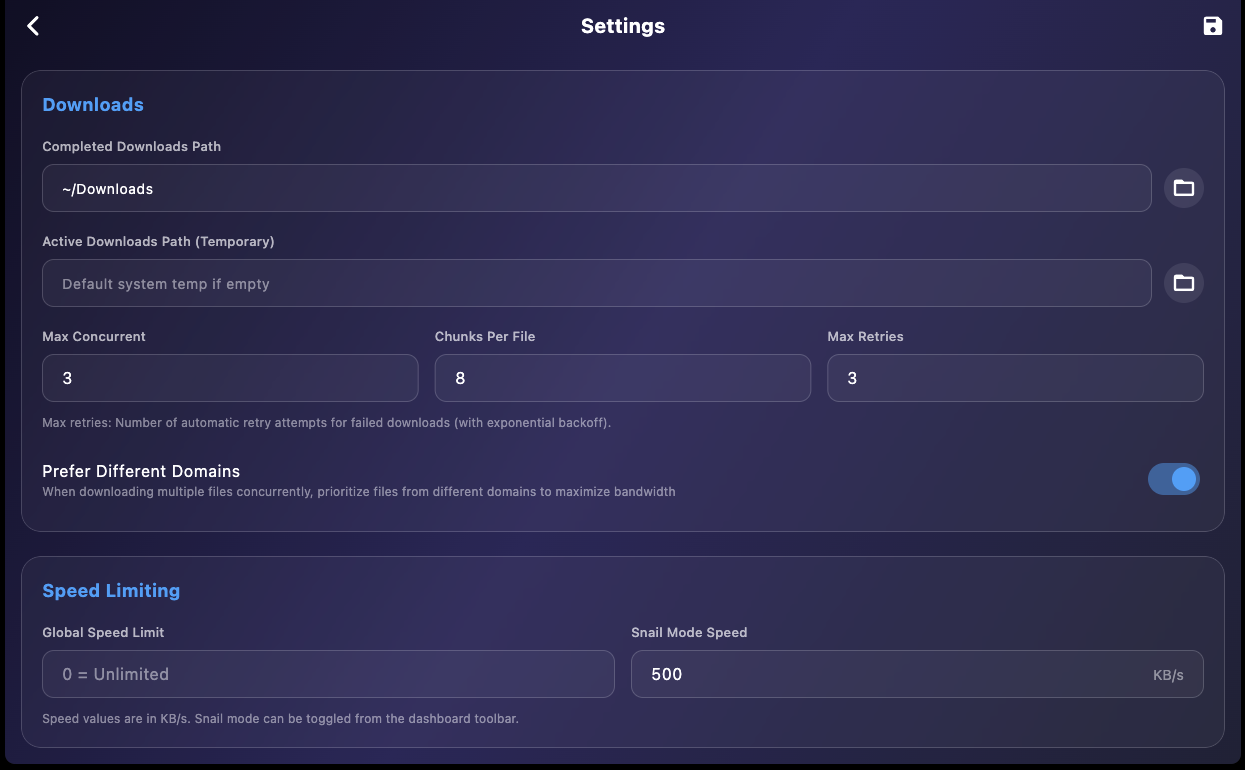
Large files download faster by splitting into parallel chunks. Configure chunk count for optimal speed.
Playlist Support
Download entire playlists from supported sites. Select which videos you want, pick quality, and batch download.
Cookie Import
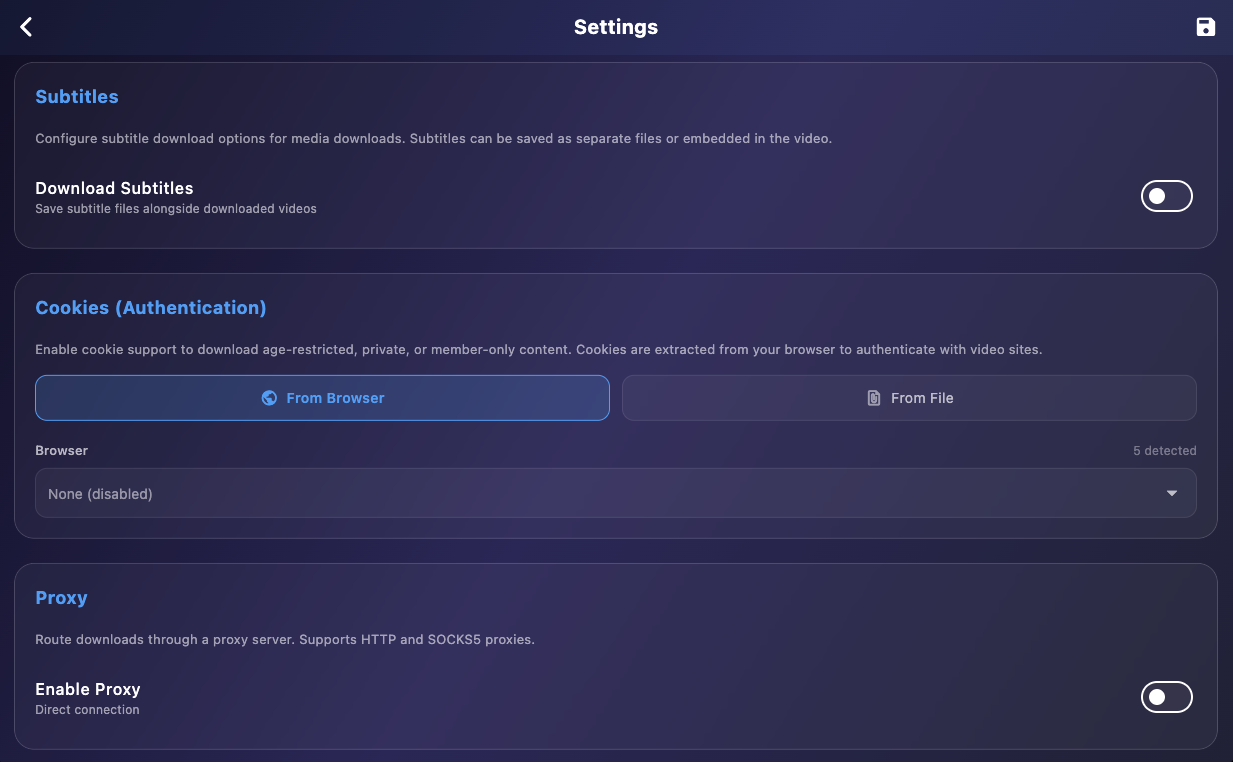
Download age-restricted or private content by importing cookies from Chrome, Firefox, Safari, Edge, and more.
Proxy Support
Route downloads through HTTP or SOCKS5 proxies with optional authentication.
No Cloud Dependency
All processing happens locally. Your download activity stays private on your machine.
Subtitle Support
Download subtitles in 12 languages. Save as separate files or embed directly into video container.
Quality Selection
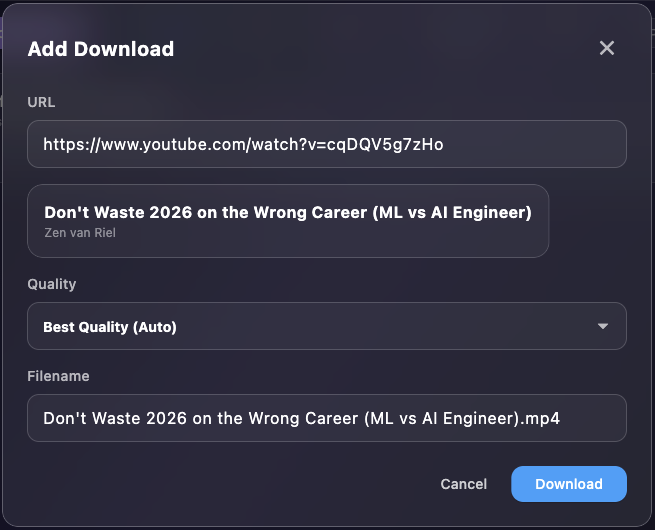
Choose from available formats: Best Quality, specific resolutions (1080p, 720p), or audio-only.
yt-dlp Auto-Update
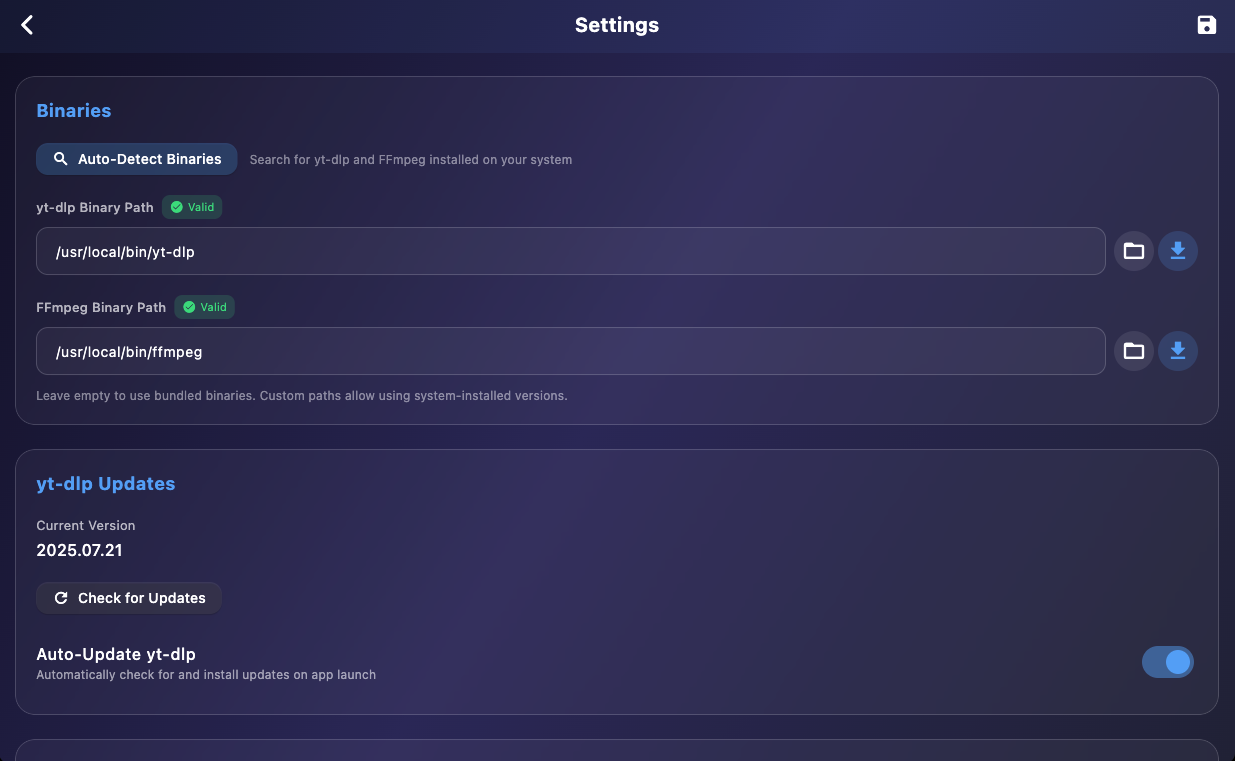
Keep yt-dlp updated automatically. Downloads from GitHub, backs up old binary, restores if needed.
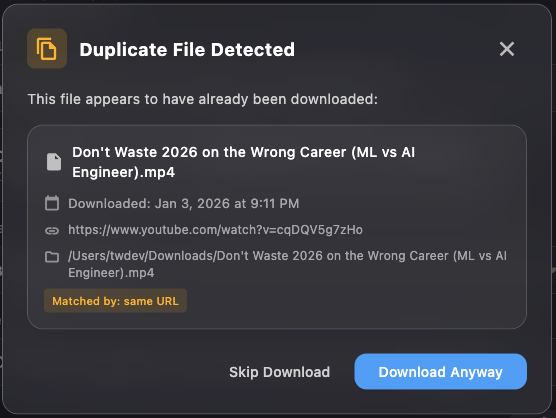
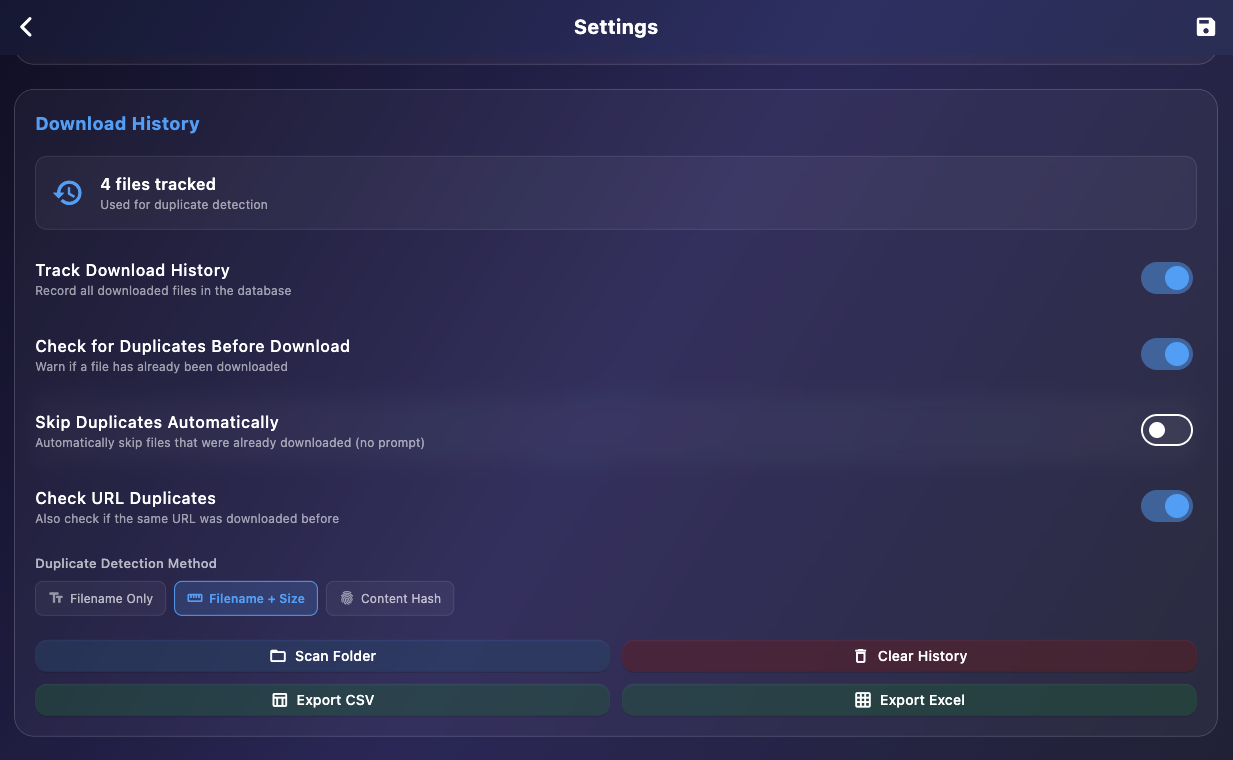
Duplicate Detection
Tracks every download in SQLite. Match by filename, size, or MD5 hash to avoid re-downloading.
Domain-Aware Concurrency
Limits connections per domain while maximizing total bandwidth across different sources.
Automatic Retry
Failed downloads retry with exponential backoff. Handles timeouts and temporary server errors.
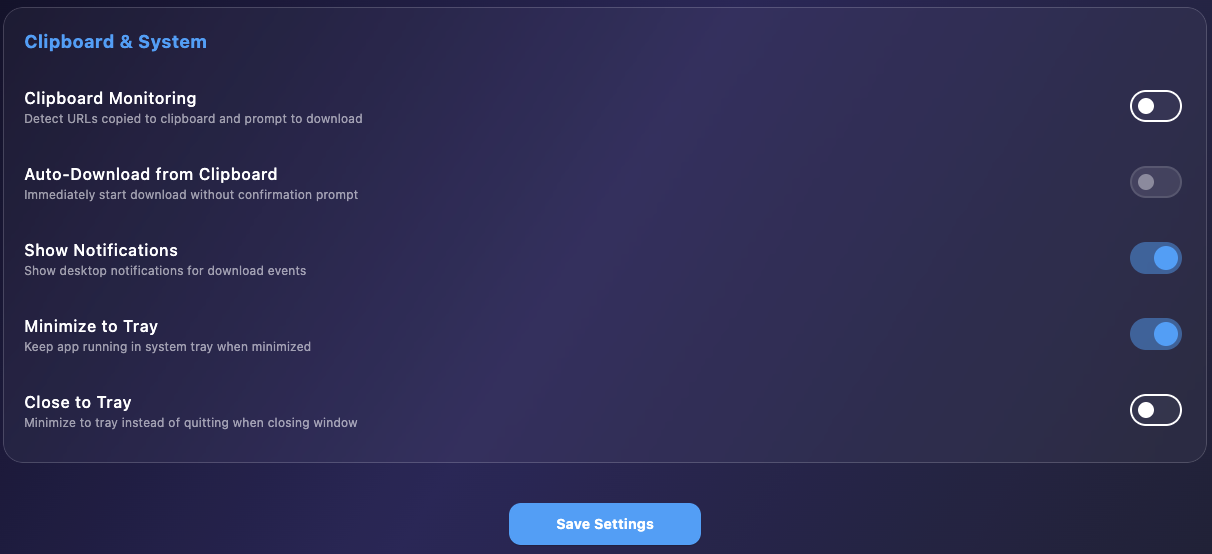
Clipboard Monitoring
Automatically detect URLs you copy. Prompt to download or start automatically.
Import/Export Lists
Share download lists via CSV or Excel. Import to queue bulk downloads.
Speed Limiting
Set global speed limits. Snail mode toggle for quick throttling when you need bandwidth.
System Tray
Minimize to tray, close to tray options. Quick actions from tray menu.
Desktop Notifications
Get notified when downloads complete or fail. Click to bring app to foreground.
Cross-Platform
Native feel on macOS, Windows, and Linux. Built with Flutter for consistent experience.
See It In Action
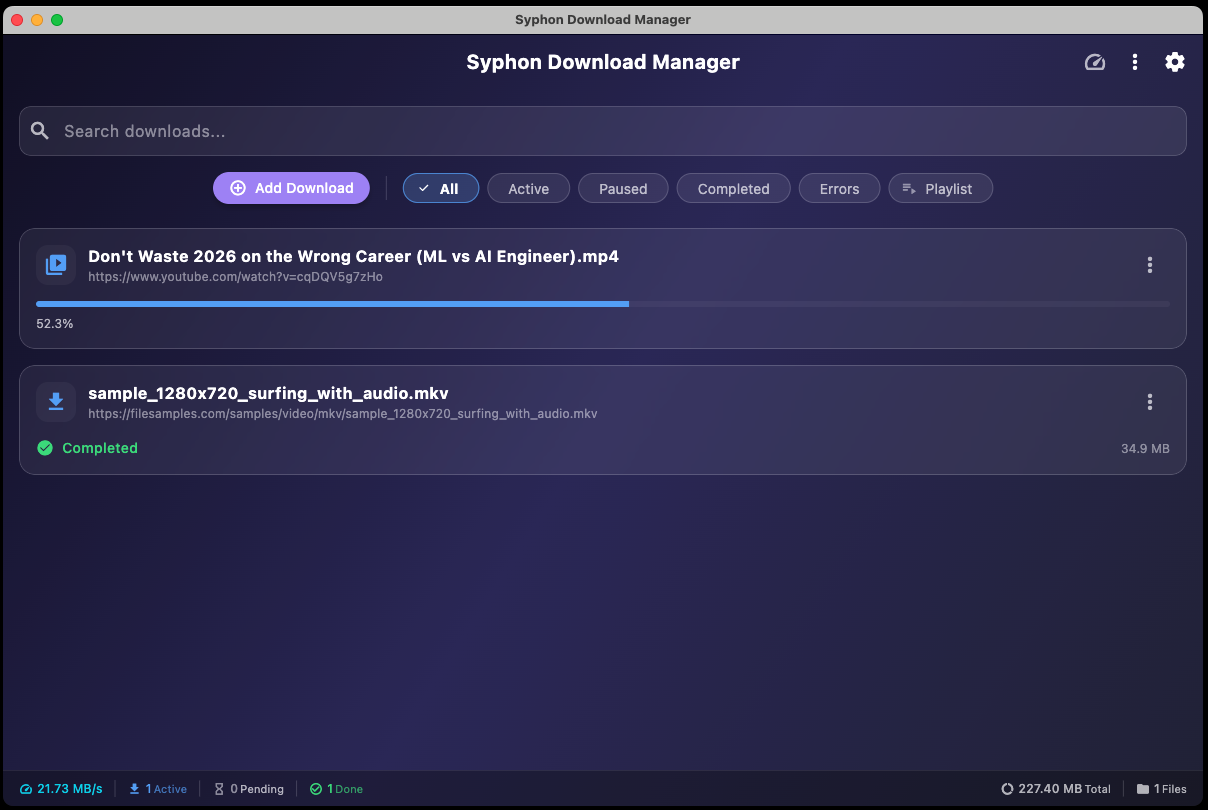
Explore the interface with these screenshots showing key features and settings.

Key Features
- Download from 1000+ streaming sites via yt-dlp
- Multi-threaded chunked downloads for fast direct file transfers
- Playlist support with selective video downloads and batch processing
- Cookie import from 8 major browsers for authenticated downloads
- Proxy support (HTTP/SOCKS5) for privacy and access control
- Automatic subtitle downloads in 12 languages with embedding option
- Duplicate detection prevents re-downloading the same files
- Clipboard monitoring with auto-download or prompt mode
- System tray integration with background operation
- Cross-platform: macOS (Intel & Apple Silicon), Windows, Linux
How It Works
Paste URL
Copy any URL and click Add Download, or enable clipboard monitoring for automatic detection.
Choose Quality
For media, select video quality or audio-only. For files, Syphon handles everything automatically.
Download
Watch progress in real-time. Get notified when done. Files saved to your chosen location.
Who Is This For?
Syphon Download Manager is built for:
Content Creators who need to archive or reference online media
Researchers collecting video content for analysis
Media Professionals managing large download queues efficiently
Power Users who want more control than browser extensions offer
Privacy-Conscious Users who prefer local processing over cloud services
Anyone tired of slow, ad-filled online downloaders
System Requirements
- macOS: macOS 11 (Big Sur) or later. Apple Silicon and Intel supported.
- Windows: Windows 10 or later (64-bit)
- Linux: Ubuntu 22.04+ or equivalent. AppImage runs on most distributions.
- Dependencies: yt-dlp and FFmpeg required for media downloads. Can be downloaded from within the app.
Getting Started
- 1
Download and install
Run the installer for your platform (DMG for macOS, MSI for Windows, AppImage for Linux).
- 2
Configure binaries
Go to Settings and set up yt-dlp and FFmpeg. Use Auto-Detect to find existing installations or Download to get them.
- 3
Set download location
Choose where you want files saved by default.
- 4
Start downloading
Paste a URL and click Add Download. That's it!
Changelog
Version 1.0.0.3 - Windows Portable & Build Updates
Released: February 12, 2026
New
- Windows Portable: New portable ZIP version for Windows — no installation required, run from any folder or USB drive
- Stall Detection & Auto-Retry: Detects downloads with no progress and automatically retries them when the queue is idle
- Configurable Stall Timeout: Set stall detection timeout from 1 to 30 minutes in Settings
Improvements
- Updated to Flutter 3.38.5 (Dart 3.10.4) across all platforms
- All Windows binaries now code-signed with Azure Trusted Signing (DIGITALCODING, LLC certificate)
- Both macOS DMGs signed and notarized with Apple Developer ID
Platform Support
- macOS: DMG for Apple Silicon (20 MB) and Intel (20 MB)
- Windows: MSI installer (11 MB) and Portable ZIP (13 MB) — NEW
- Linux: AppImage (17 MB)
Version 1.0.0.2 - Bug Fixes & Feature Updates
Released: January 7, 2025
✨ New Features
- Stream Detector Integration: Added browser-based media extraction for seamless download workflow from supported streaming sites
- Clipboard Auto-Download: Improved clipboard monitoring with silent failure handling for better user experience
- Enhanced Status Messages: Added detailed status indicators for download queue items and processing states
- Download List Management: Import/export download lists via CSV or Excel for sharing and backup
- Download History Export: Export your complete download history to CSV or Excel formats
- Real-Time Status Bar: New status bar showing live download statistics and activity
- Clear by Status: Quickly clear completed, failed, or cancelled downloads from your queue
🐛 Bug Fixes
- Fixed clipboard duplicate detection not working correctly
- Fixed status message display issues in download list
- Fixed max concurrent downloads setting not being respected
- Fixed media download issues and improved HLS progress tracking
- Fixed YouTube download problems with better format selection logic
- Fixed download progress display for HLS/streaming content
- Fixed Terms & Conditions dialog not appearing on macOS first launch
- Fixed stream-detector extraction to properly copy entire extension directory
⚡ Improvements
- Increased yt-dlp probe timeout for better reliability with known video hosts
- Improved extraction reliability for adult content sites (stream-detector)
- Disabled Download button during URL processing to prevent accidental double-clicks
- Updated Terms & Conditions to match latest DigitalCoding policies
- Added domain-aware concurrent download selection for optimal bandwidth usage
📦 Platform Support
- Windows: MSI installer (11.1 MB)
- Linux: AppImage (17.1 MB)
- macOS: DMG for Intel (19.7 MB) and Apple Silicon (19.7 MB)
Version 1.0.0.1 - Initial Release
- Two download engines: yt-dlp for streaming sites and native HTTP for direct downloads
- Multi-threaded chunked downloads for faster file transfers
- Playlist support with selective video downloads
- Cookie import from 8 major browsers
- Proxy support (HTTP/SOCKS5)
- Automatic subtitle downloads in 12 languages
- Duplicate detection with SQLite history tracking
- Clipboard monitoring with auto-download
- System tray integration
- Cross-platform: macOS (Intel & Apple Silicon), Windows, Linux
What's Next?
We're actively developing new features including:
- Browser extension for one-click downloads
- Scheduler for timed downloads
- Download speed scheduling by time of day
- More streaming site support as yt-dlp updates
- Localization for additional languages
We'd love to hear your suggestions. This tool was built to make downloading simple and fast.
Get Started Today
Download Syphon Download Manager and take control of your downloads with a modern, powerful desktop app.
Download Now
Need a Custom Desktop Application?
We build modern, cross-platform desktop applications tailored to your business needs. From internal tools and data analyzers to customer-facing software. Tell us your requirements and we'll build a polished application.
Discuss Your Project