aws
The Model Suggested a Refund. Who Can Issue It?
Published Updated
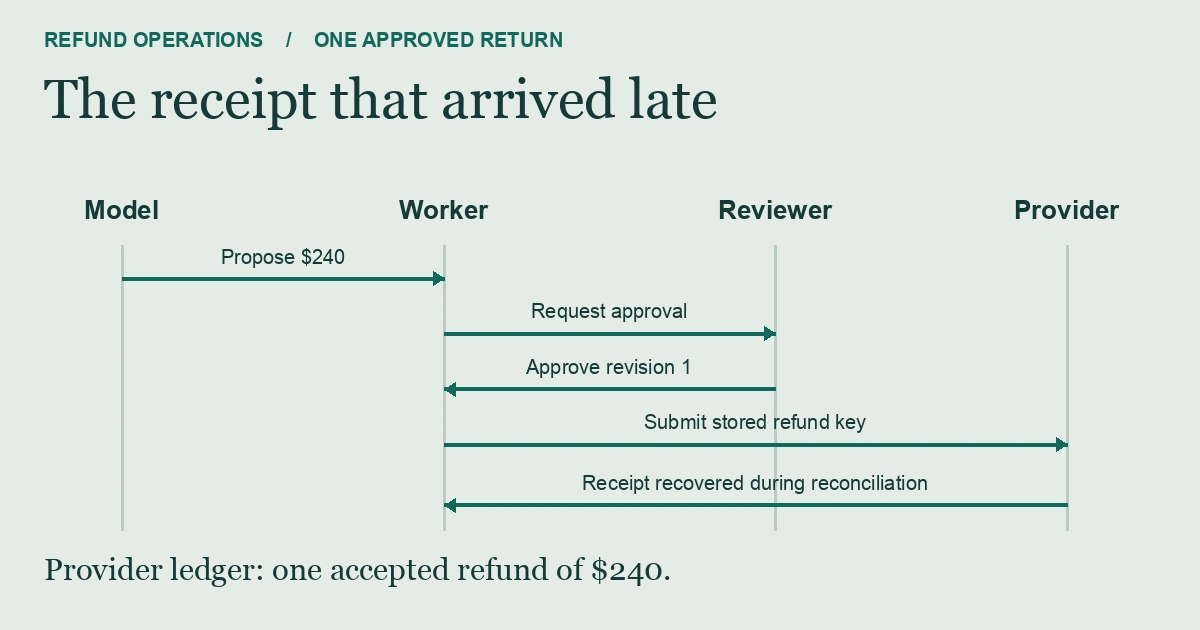
A customer returns a pair of desk lamps. The return is on file, the order belongs to the customer, and the requested refund is $240. The payment provider accepts it. Before the worker can save the receipt, its connection drops. A minute later, the support ticket lands on the queue again.
What should the second worker do? The language model got the order and amount right on the first attempt. The difficult question now is whether money has already moved.
Let Bedrock propose a refund
The SQS message identifies a support case. Lambda loads its customer and eligible orders from the support system, supplies those candidates to Amazon Bedrock, and asks for a structured proposal. For this fictional return, the useful fields are order reference, return reference, currency, and amount in minor units. For USD, 24000 cents represents $240.00. If two purchases match, the worker requests clarification.
With client-side tool use through Bedrock Converse, define a single tool called propose_refund. A tool-use block carries the requested tool name and arguments. Application code decides whether to accept them. Validate the tool name, schema, types, and candidate references. A syntactically valid order number can still belong to somebody else. The worker’s IAM role can write a proposal but has no access to the payment credential. This is where LLM05 Improper Output Handling and LLM06 Excessive Agency affect the design. Bedrock tool-use response · OWASP Top 10 for LLM Applications
Bind approval to the exact amount
Look up the order again. Check customer ownership, accepted return, currency, original payment, prior refunds, and remaining refundable balance. Have the application calculate the eligible amount using the order ledger. In our example, two returned lamps at $120 each account for the full $240.
Store the verified proposal with its revision and a stable business operation ID in DynamoDB. Use an AWS Step Functions Standard workflow to wait for approval. The review screen shows the order, both returned items, and the checked amount. An authenticated backend checks the reviewer’s authority and completes the callback. Keep the task token on the backend. Changing the amount or order creates a new proposal revision and requires fresh approval. Step Functions callback pattern
One approved refund across four participants
- Model → worker
Propose $240 against the supplied order and return.
- Worker → reviewer
Show the verified amount and evidence for revision 1.
- Reviewer → execution worker
Authorize revision 1. Recheck balance and atomically reserve $240 for this operation.
- Execution worker → provider
Submit with the stored operation key. A lost reply leaves the outcome pending.
- Provider → execution worker
Reconcile the existing operation and store its provider receipt.
- Worker → support
Close the case once. A duplicate delivery returns the recorded outcome.
Handle the minute when nobody knows
Give the execution worker a separate role with access to the payment integration. Before submission, use a conditional transaction to claim the approved operation and reserve its amount against the order balance. Store the operation key before the network call. A second ticket about the same returned items must resolve to the same business refund or be held for duplicate review. A new SQS message ID is a poor payment key. DynamoDB transactions · Lambda and SQS delivery
A timeout after submission leaves an unknown provider outcome. Preserve the reservation. Reconcile using the provider’s operation lookup or its documented idempotent replay within the provider’s retention window. On confirmation, save the receipt and settle the reservation once. If the provider cannot establish what happened, route the case to payment operations before any further submission. Creating a fresh key at this point could issue a second refund.
Run the lost-receipt drill
Use a fake payment provider that records one accepted refund, then drops the first response. Deliver the same queued job twice, including once while reconciliation is underway. Inspect the provider ledger as well as your case table.
| Observation | Passing result |
|---|---|
| Two workers pick up the same approved return | One active refund operation and one $240 reservation |
| Provider accepts and the response disappears | Case stays pending reconciliation |
| Existing provider receipt is recovered | One settled $240 refund, one receipt, one closed case |
| Amount changes after approval | Execution waits for a newly authorized revision |
The customer’s bank statement is the deciding evidence. Two support events and a worker timeout should still add up to one $240 refund.
How DigitalCoding Can Help
If support staff switch between a help desk, an order system, and a payment dashboard to settle one return, DigitalCoding can help connect those steps. We can prototype a refund review screen and use your payment provider’s sandbox to test what staff see when a refund succeeds but its receipt arrives late.
We’d start with one type of return and the approval rules your team already uses. Tell us which support platform and payment provider you use, who signs off, and how staff reconcile an uncertain refund today. Explore approval workflow automation or start a refund workflow project.