aws
Where Did the Claimant’s Phone Number End Up?
Published Updated
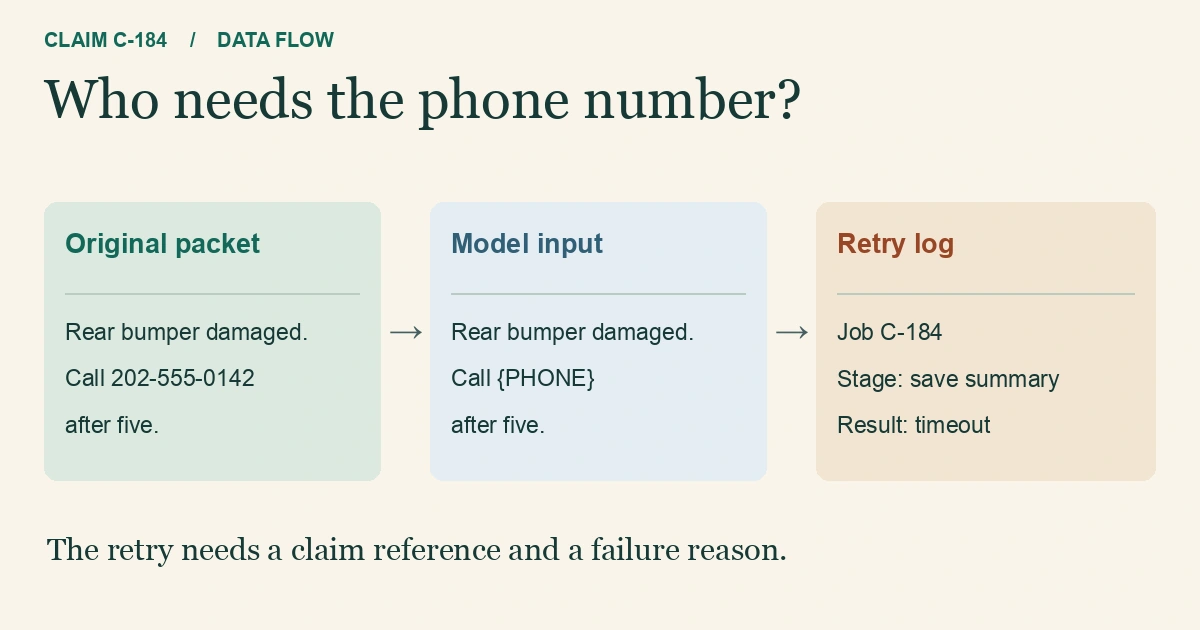
The summary on an adjuster’s screen reads, “The driver reported damage to the rear bumper while reversing.” Exactly what the intake team needs. Later, an engineer investigating a failed write finds a phone number in the application log. The summary was fine. The exception handler had serialized the original job.
Follow fictional auto claim C-184 through an AWS worker. The assignment is narrow: prepare a short account of the reported incident for an adjuster. Coverage decisions, fault, and claimant contact details belong elsewhere. OWASP’s LLM02 Sensitive Information Disclosure shows up wherever the text travels, including the retry path. OWASP Top 10 for LLM Applications
Put a reference on the queue
Keep the scan-cleared claim packet in restricted, encrypted S3 storage. Put an opaque job ID on Amazon SQS. A Lambda worker resolves that ID to the authorized claim and object version. The queue, its dead-letter queue, and an operator inspecting failed messages can all work with that reference. Each additional copy of a claimant’s narrative would need its own access and retention controls.
Use Amazon Textract to locate the incident field. Its query response can contain an answer, confidence, and a location on the page. For a longer narrative, use the relevant detected text blocks and verify that the field is complete. Keep a source reference for the adjuster. An unreadable narrative goes to review. Sending the entire packet to recover one missing field would also send the contact page. Amazon Textract query responses
Follow one field through the worker
Restricted claim record
Original page, contact field, incident narrative, and the authorized adjuster’s source link.
Summarization request
Selected incident text after screening. The model can complete its assignment from this passage.
Failure path → log the opaque job ID, stage, attempt, and error category. The retry resolves the same protected source again.
Assume someone wrote the number twice
Selecting the incident field removes the contact section. It still leaves whatever a claimant typed in free text. Our sample ends with “Call me at 202-555-0142 after five.” Use a versioned Bedrock Guardrail with the phone entity configured for masking. Apply it to the selected text before generation. On a masking result, build a fresh model request from the returned masked text. On a block, a timeout, or an unusable screening response, hold the job. Passing the original variable to the model after successfully masking a copy defeats the whole step. Bedrock sensitive information filters
Ask the model to summarize what the driver reported and leave unknown facts open. Screen the output before saving it, and bind it to the original claim’s access policy. A useful review screen shows the summary and a controlled link to its evidence. An adjuster who needs to call the driver can open the contact record through the existing claim system.
Check the second logging pipeline
A Lambda log entry such as “C-184, save-summary, retryable timeout” can answer an operational question without reproducing the claim. Inspect error serializers too. SDK requests, raw OCR, guardrail traces, and model responses can contain the very values a redacted summary omits.
Bedrock model invocation logging has its own account-and-Region configuration. It is disabled by default. When enabled for supported calls, it can deliver inputs and outputs to CloudWatch Logs or S3. Inspect the actual configuration and destinations for the workload. Limit access and retention for any content deliberately captured. Cleaning up Lambda log statements addresses only one copy. Bedrock invocation logging
Force the failure before the first real claim
Use the fictional number in both the contact field and narrative. Let summarization succeed, then make the destination write fail. Run the retry to its terminal outcome in a test environment and inspect each destination using its own access role.
| Destination | What the test should find |
|---|---|
| Restricted original and authorized OCR working data | The number where it appeared on the form |
| Generation request and adjuster summary | Incident details, with the synthetic number absent |
| Queue, dead-letter queue, and worker logs | An opaque reference and enough context to diagnose the failed stage |
| Configured invocation-log destinations | Only content allowed by the workload’s logging policy |
Have an operator resolve the failed job using the operational record alone. If they can explain which stage failed and safely replay it, they have the evidence they need. If the synthetic number turns up in a trace, you have found a specific copy to remove before a real claimant supplies one.
How DigitalCoding Can Help
DigitalCoding can help your claims and engineering teams trace one intake form from upload to the adjuster’s screen. Using a synthetic claim, we can test a failed write, inspect what reached the retry queue and logs, and show your team where to remove unnecessary personal details.
If you’re planning a claims summarization pilot, tell us which form consumes the most adjuster time and which fields belong in the summary. A description of the workflow is enough for the first conversation. Explore AI automation services or start a claims intake project.