accounts-payable
AI Invoice Processing From Email Attachment to Approval
An invoice arrives in the accounts payable inbox. Someone opens the attachment, finds the supplier in the accounting system, enters the amount, checks the purchase order, and asks a manager to approve it. If a reference is missing, the work moves into an email thread.
AI invoice processing can help with the reading and preparation. It can extract fields from different invoice layouts and put the supporting information in front of the right person. The useful outcome is a checked record ready for the existing approval process. Payment remains a separate decision.
For a small finance team, the starting point is one inbox and a defined set of invoices. That gives the team a manageable way to test the process before connecting more suppliers or systems.
Give AI a reading job
AI extraction turns an attachment into proposed data. That might include the supplier name, invoice number, date, currency, purchase order reference, line items, tax, and total. It should return an empty field when the document does not provide an answer.
This is an available technical capability. For example, Amazon Textract's expense analysis API returns summary fields and line item groups, with confidence and document location information. That does not establish whether a supplier is genuine or a purchase was authorized.
Keep those decisions in explicit rules. The approved vendor list determines which supplier account can be used. Purchase order and receiving records support the match. Your approval policy determines who signs off. AI can suggest a coding category, but a suggestion should remain visible as a suggestion until accepted.
Our article on document processing explains the broader pattern. Invoice work needs particular care because extracted numbers can become financial records.
Keep the attachment and its history
When an email enters the workflow, save the original attachment with a receipt time, message reference, and internal processing ID. Keep the original unchanged. A renamed file or corrected extraction should not replace the evidence that arrived.
Apply the business's file checks before processing. Restrict accepted formats and sizes, scan attachments, and send unreadable or protected files to staff. Give the integration access to the designated mailbox and records it needs. Keep invoice data out of general chat channels.
Store each proposed value beside its source page or highlighted document region where available. A reviewer should be able to see whether the total came from the amount due, a previous balance, or a line item. Record the extraction version and subsequent corrections so a rerun does not silently change an already approved record.
A fictional invoice from Harbor Supplies
This worked example is fictional. Harbor Supplies emails invoice INV-1042 for $1,260, referencing PO-318. The workflow extracts those values and retains the PDF beside them.
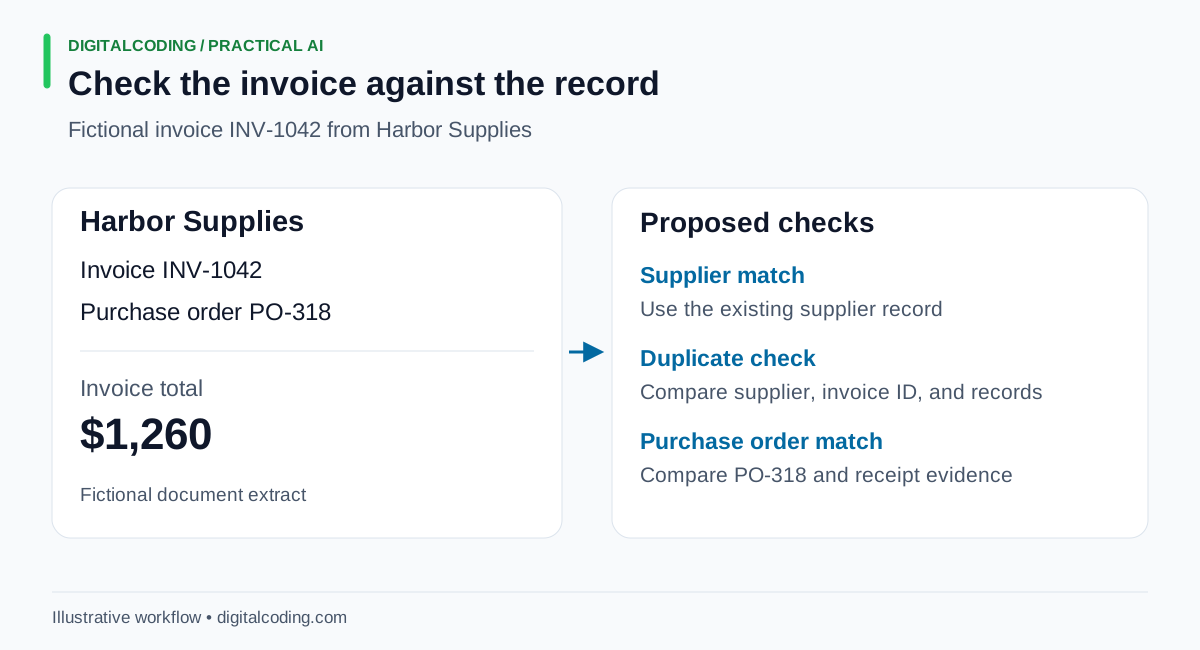
The extracted fields become proposed values. Duplicate and purchase order checks use separate business records.
The supplier name matches an existing vendor record. The workflow then checks that PO-318 belongs to that vendor and the correct business entity. It compares the invoice lines with the remaining purchase order quantities and prices, then looks for the receiving evidence required by the company's policy.
Suppose the total agrees with the purchase order, but the receiving record is missing. The invoice goes to the receiving contact with a clear reason. It does not pass simply because the numbers agree.
Once staff confirm receipt and attach the evidence, the authorized manager can approve the prepared record. If the invoice instead contains a changed bank account, that change is held for independent verification. Approval of the purchase does not approve new payment details.
If Harbor Supplies forwards INV-1042 again, the second email should point to the existing work item. It should not restart approval or create another bill.
Write the checks before connecting the accounting system
Use ordinary calculations for arithmetic. Recalculate line extensions, subtotal, tax, and total. Keep currencies explicit and apply the rounding rules agreed with finance. Do not ask a language model to decide whether a total is close enough.
Define how partial deliveries, non-PO invoices, credit notes, and amended invoices are handled. An amendment should be linked to its earlier version and reviewed for its effect on previous approval. It should not be treated as a fresh, unrelated invoice.
Duplicate checks need more than the filename. Use the supplier's internal ID, invoice number, business entity, and other relevant fields to find likely duplicates. Compare document fingerprints for exact copies. Flag similar records for review because a changed scan or punctuation can defeat an exact match. Confirm suspected duplicates before discarding them.
Set field-specific review rules using representative invoices. A faint invoice number can cause a duplicate failure even when the total is readable. AWS's confidence guidance recommends considering both confidence scores and the sensitivity of the use case. A high extraction score still does not prove that an invoice is payable.
Route exceptions to someone who can resolve them
The review queue should say what failed, show the evidence, and name the next action. A missing receipt goes to operations. A price discrepancy goes to purchasing. A new supplier goes through vendor onboarding. A failed connection goes to the person responsible for the integration.
Vendor changes deserve their own control. Verify changes to bank details or payment procedures through an established contact using a known number, rather than contact details supplied in the change request. The FBI's business email compromise guidance specifically recommends independent checks of this kind.
Preserve approval limits and separation of duties. Record who corrected a field, who approved it, and when. If material fields change after approval, return the record for the required review.
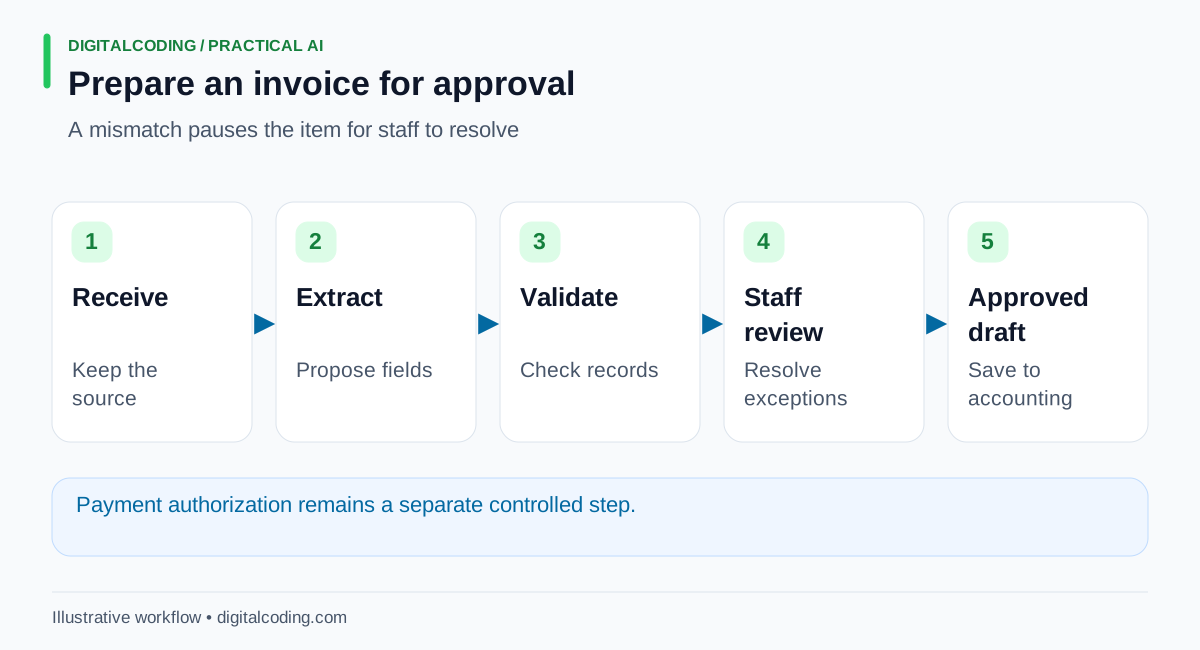
The workflow prepares a reviewed accounting draft. Payment authorization stays in the existing payment process.
Make system updates safe to repeat
Begin with the tools the team uses. That could mean a review list in Microsoft 365, documents in an existing file store, and an approved import file for accounting. Use a supported API where it meets the system's requirements. A controlled import is a reasonable starting point when it does not.
Prevent duplicate writes as well as duplicate intake. Save the accounting record ID after creation. If a request times out, check whether the record was created before trying again. Use a stable request identifier where the target API supports it. Intuit documents request IDs for correlating requests and preventing repeated operations.
A failed update should remain visible and retryable. Mark the invoice transferred only after the destination confirms the result. Match the final accounting record back to the approved values.
Test on the awkward invoices
Run a pilot in which staff review every result. Include mixed layouts, missing references, repeated emails, credit notes, poor scans, and interrupted updates. Count field corrections, unresolved exceptions, duplicate catches, and successful transfers. Measure staff time using the actual review work.
Keep the manual route available. Expand the workflow when the evidence shows that staff can resolve exceptions and trust the transfer history.
How DigitalCoding Can Help
DigitalCoding can help map invoice intake, extraction, matching, approval, and accounting handoff around your current tools. Our founder brings more than 25 years in software development, including cloud systems and current AI automation work.
Our AI automation services can start with a narrow pilot and clear review rules. Use Start a Project to describe your accounting system, invoice volume, purchase order process, and the exceptions that take the most attention. Share representative documents through an agreed secure channel so the proposed workflow can be tested against the work your team actually handles.