ai-automation
AI Workflow Automation for Small Businesses and Where to Start
An invoice arrives in a shared inbox. Someone downloads it, finds the supplier record, copies the details into a spreadsheet, and asks a colleague to check the purchase reference. None of those steps feels large. Together, they take attention away from work that needs a person.
This is a useful place to begin thinking about AI workflow automation. Pick one repeated job, understand how it works today, and test whether a small change makes it easier to finish correctly. You can make that decision before choosing a platform or connecting every business system.
Separate the workflow from the AI
A workflow is the sequence of actions that moves a piece of work from arrival to completion. It includes the people, records, decisions, and exceptions along the way.
Automation handles a step without someone doing it manually each time. A rule that saves an email attachment to the right folder is automation. It may need no AI at all.
AI can help where the input varies, such as identifying useful details in differently formatted documents or suggesting a category for a customer message. The surrounding process still needs clear rules about what happens next.
For a first project, keep those roles separate. Let a rule check whether an invoice number already exists. Consider AI for preparing a draft from varied invoice layouts. Let an authorized person approve a payment.
Choose a job you can check
Write down a few recurring tasks that interrupt the team. Include who does each task, where its input comes from, and what a correct result looks like.
Compare candidates using three practical tests.
- Repeat work means the task occurs often enough for a change to matter.
- Clear rules means staff can explain the expected result and recognize exceptions.
- Review effort means someone can check the output without repeating the entire task.
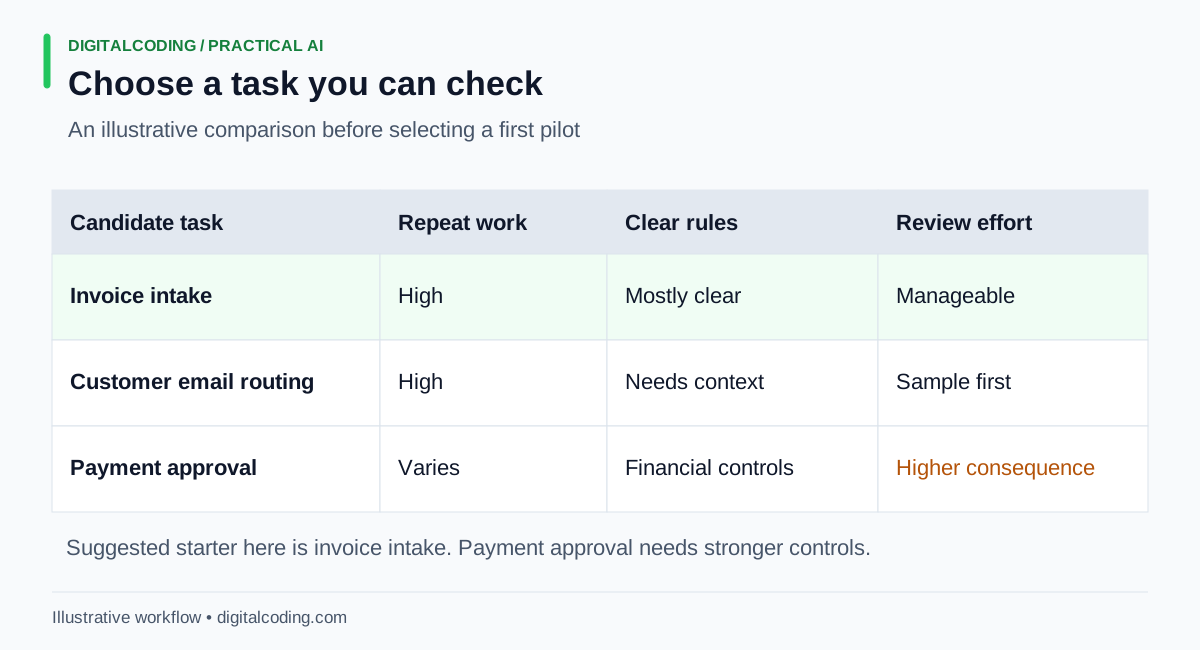
Compare the work and the cost of checking it before choosing a first automation.
The scorecard is an illustrative comparison, not a ranking that fits every business. Invoice intake is the suggested starter because a draft can sit beside its source document. Email routing may work too, but messages covering several topics can complicate the categories. Payment approval carries a different consequence when a decision is wrong.
Choose a manageable slice. For example, start with invoices from established suppliers sent to one inbox. Leave unfamiliar suppliers, payment changes, and disputed amounts with the existing manual process.
Illustrative worked example of invoice intake
Consider a small business that receives 30 supplier invoices in a typical week. These numbers are assumptions for the example, not DigitalCoding client results.
Suppose staff currently spend four minutes per invoice opening the attachment, copying fields, checking the record, and handling issues. That is 120 minutes a week.
The pilot prepares a draft intake record with the supplier name, invoice number, date, total, and purchase reference. The original attachment stays available beside the draft. An employee checks each field before saving it to the approved business record.
If the purchase reference is missing, the draft says it is missing. The workflow routes that item for follow-up instead of guessing. A duplicate check uses the business's agreed matching rules. Nothing in this pilot approves or schedules payment.
Now assume review takes an average of two minutes per invoice, including exceptions, with another 15 minutes each week spent checking failed runs and maintaining the setup. The new total is 75 minutes. The difference is 45 minutes a week.
That calculation helps set expectations. It does not establish that a system is worth buying. Subscription charges, setup work, access management, and staff training still count. If reviewing unreliable drafts takes four minutes each, the apparent saving disappears before maintenance is included.
Our article on document processing explores the document side of this work. The first business decision is whether preparing those records is a meaningful bottleneck for your team.
Run a pilot with a clear boundary
Start by observing the current task. Use representative examples, including awkward ones, to record handling time, common corrections, and the points where work waits for another person.
Then define the pilot in a short written note. State which inputs it accepts, what it can create, who reviews the result, and how staff return to the usual process if it fails. Assign one person to own the pilot.
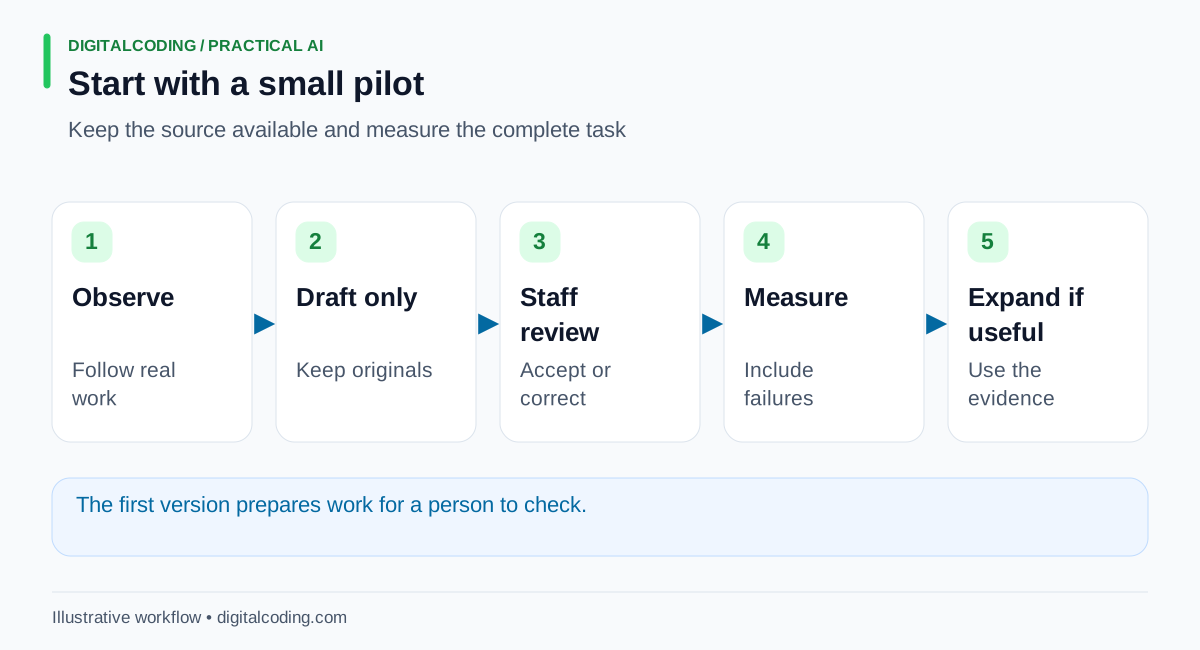
Observe the work, prepare drafts, review them, and measure the whole task before expanding access or responsibility.
Draft-only operation gives the team a chance to learn without immediately changing customer messages or financial records. It still requires care. Reviewers need access to the source and enough time to check it properly.
NIST's Generative AI Profile identifies confidently presented false output as a generative AI risk. For an intake workflow, that means a plausible-looking field should not be treated as proof that the source contained it. Missing information needs a visible route back to a person.
Before using business data, establish what will leave your systems, who can access it, and how it will be retained or deleted. Use approved sample data while the setup is being evaluated. Keep access limited to the records and actions the pilot actually needs.
Measure the work that remains
Track a small set of measures that describe the complete job.
- Total staff handling time, including review and corrections.
- The number of items that finish correctly and those that need manual recovery.
- Waiting time between arrival and completion.
- Ongoing tool costs and time spent maintaining the workflow.
Include failed runs and difficult inputs. Comparing an easy automated batch with a difficult manual week gives a misleading result. Keep the trial scope consistent, and write down changes in volume or document quality.
Some pilots should stop. A small volume may not justify maintenance. Poor source data may make review too slow. A clearer form or an ordinary integration may solve the problem more cheaply. Those findings are useful because they prevent a larger commitment to the wrong task.
How DigitalCoding Can Help
DigitalCoding can help identify a suitable first workflow, examine the systems involved, and define a pilot with clear review and recovery steps. The founder brings more than 25 years of software experience, including cloud systems and current AI automation work.
Our AI automation services cover work where AI can support a practical business process. Consulting can help when the first need is understanding the bottleneck or deciding whether automation makes sense.
To discuss a starting point, contact DigitalCoding with one repeated task, the tools your team uses, and the part that causes the most rework. An in-person workflow evaluation can be discussed when seeing the work directly would help define the right next step.