ai-automation
What Happens During an On-Site AI Workflow Assessment
The written process says a customer request goes from the shared inbox to operations, then to finance. In practice, someone keeps a second list because requests sometimes arrive without a reference. A colleague knows which customers need a phone call. Finance checks another spreadsheet before it can finish the record.
An on-site AI workflow assessment makes those details visible. It is a practical look at how work moves through the business, where it slows down, and which changes deserve attention. The useful outcome is a grounded next step. That might involve AI, ordinary automation, or a clearer handoff between people.
Agree on the work to examine
The visit should have a defined scope before anyone arrives. Choose a workflow with a clear beginning and end, such as receiving a service request and creating an approved job record.
Trying to examine every department at once can leave you with broad observations and little evidence. A narrower scope gives staff room to explain what actually happens, including the exceptions that a process diagram tends to leave out.
Agree who needs to take part, which systems can be viewed, and what information is off limits. Confirm whether observation, notes, screenshots, or sample records are permitted. Access to a live system should be arranged through your normal process. Staff should not need to share personal passwords.
The scope should also explain the expected written output and how recommendations will be discussed. Fees, timing, travel arrangements, and any later implementation work belong in that conversation before the visit.
Follow a real item through the business
During the assessment, the person doing the task walks through an example. They show what arrives, what they check, what they copy, and where they send it next.
The aim is to understand the work, not judge how quickly someone clicks through it. Staff often keep a process running through knowledge that has never been written down. An extra spreadsheet or a reminder note may be compensating for a gap elsewhere.
Where possible, follow both a routine item and one that needed rework. The difference can explain more than a long list of software features. A routine request may take little effort, while an incomplete request causes several messages and repeated checks.
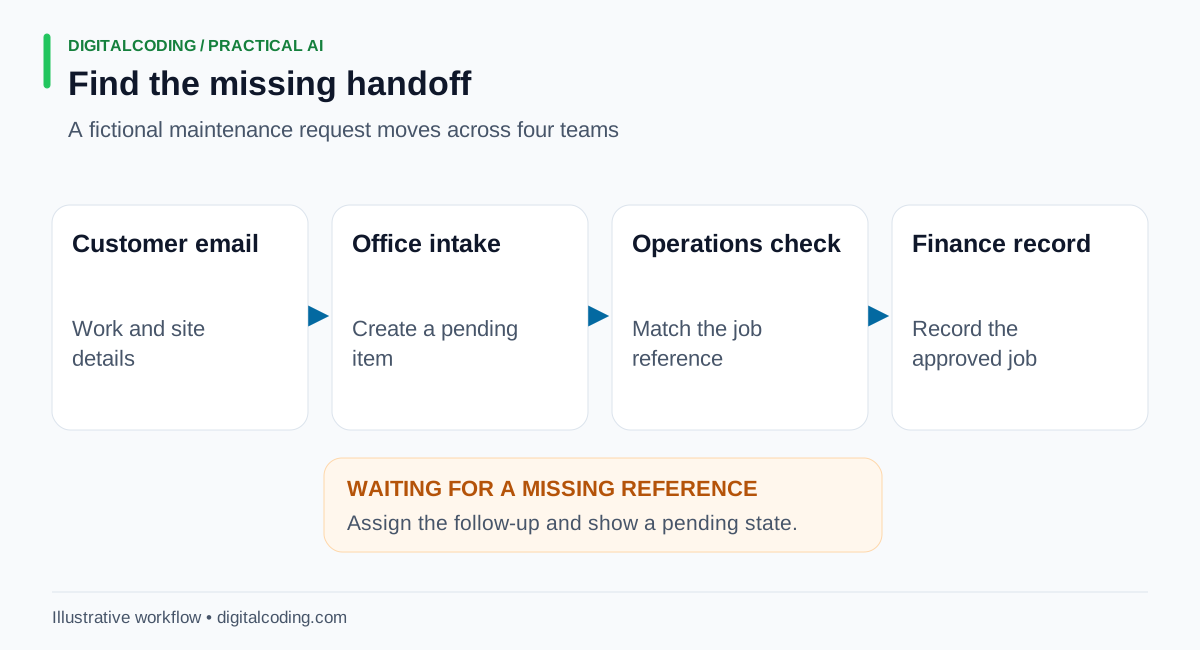
Following one request across handoffs reveals where missing information creates waiting and repeated work.
The diagram separates the movement of the item from the time it spends waiting. That distinction matters. Faster data entry at office intake will have limited value if operations still cannot proceed without a reference from the customer.
Illustrative worked example of a missing reference
Consider a small maintenance business receiving customer requests by email. This is an invented example to explain the assessment process, not a report of a DigitalCoding engagement.
Office staff read the message and create an entry in a job spreadsheet. Operations checks the requested work against the customer account. Finance later records the approved job in its own system.
One request describes the site and the work but omits the customer's job reference. Office staff enter the message anyway because they expect operations to recognize it. Operations cannot match it confidently and sends a question back. Finance sees the incomplete entry and starts another check.
Watching that item move through the team reveals a handoff problem before it reveals an AI opportunity. Nobody owns the missing-reference follow-up, and the pending status is unclear.
The first recommendation could be to assign that follow-up to office intake and give incomplete requests a visible pending state. The next could be an intake form or an integration that avoids copying agreed fields. AI extraction might then be worth testing for email requests that still arrive in varied formats.
An extraction tool should not invent the absent reference. The team still needs a rule for getting it from the customer. The assessment has helped put the changes in a sensible order.
Examine systems and constraints together
Once the work is understood, review the tools supporting it. That includes the shared inbox, spreadsheets, business applications, document storage, and any existing integrations.
The practical details affect what can be recommended. A system may allow a draft record but restrict final approval. An existing integration may already cover the task. A proposed connection may require a different subscription or an administrator's involvement.
Data boundaries matter too. Identify the information the workflow uses and the access a proposed tool would need. A demonstration with sample records can help evaluate an idea without opening access to an entire customer archive.
This stage should also identify who would maintain a change. A workflow that depends on an account nobody owns, or a spreadsheet only one person understands, is difficult to support when staff responsibilities change.
Leave with priorities your team can use
A useful assessment report connects each recommendation to an observed problem. It explains the proposed change, who would own it, what must happen first, and how the business could tell whether it helped.
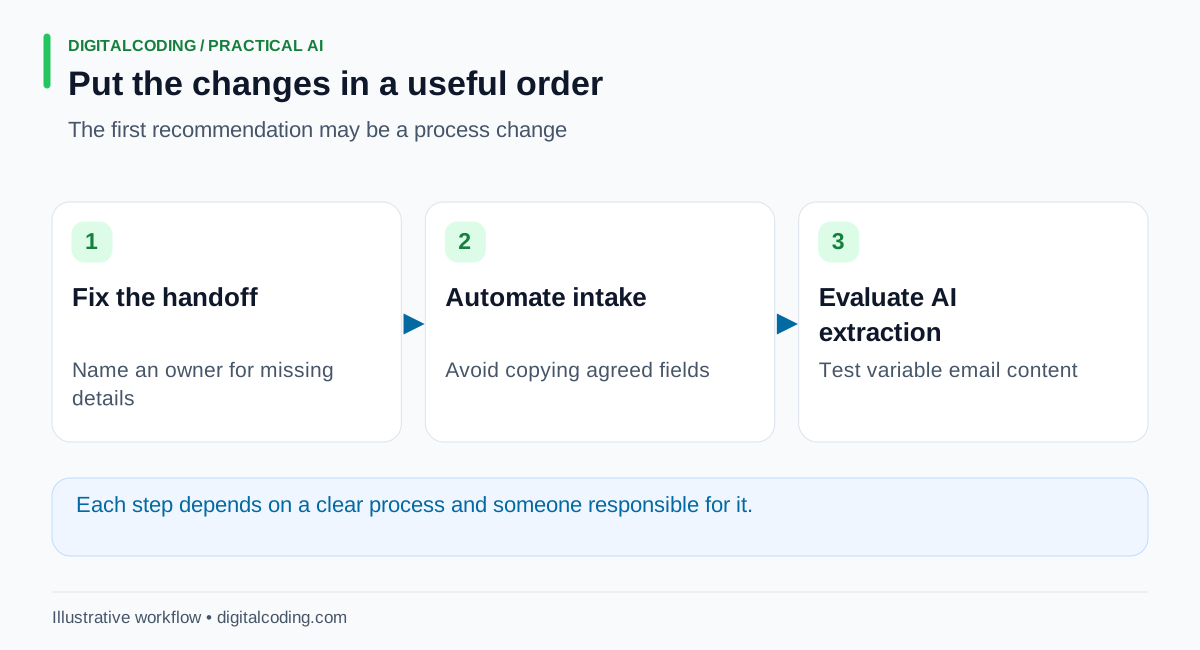
Sequence the changes so that a tool supports an agreed process and can be evaluated against it.
For the maintenance example, the priority order is to fix the missing-reference handoff, reduce repeated intake entry, and evaluate AI extraction only where variable emails still create useful work to remove. Each recommendation has a reason and a dependency.
The report should distinguish evidence from assumptions. If staff estimate a task's frequency, label it as an estimate. If a software connection has not been tested, identify that uncertainty before treating the recommendation as an implementation plan.
Prepare without staging a perfect day
Bring the process as it is. A short description, examples of routine and difficult work, and access to the people involved are more useful than a polished presentation.
Gather any existing instructions and note which records the team treats as authoritative. Remove information that is not needed for the agreed review. Let participating staff know the purpose so they can explain workarounds candidly.
There are limits to a visit. A quiet day may hide a peak-period problem. Recent staff changes may distort the picture. Some recommendations need follow-up measurement or a technical check before a commitment makes sense. The assessment should record those gaps rather than hide them behind precise savings forecasts.
How DigitalCoding Can Help
DigitalCoding offers in-person workflow evaluation to help businesses understand where time, information, and responsibility get lost between systems. The founder has more than 25 years of software experience, including cloud systems and current AI automation work.
Our consulting services can help define the scope and assess practical options. Where the evidence supports a pilot, AI automation services can help turn the recommendation into a workflow with clear ownership and human review.
To discuss an on-site assessment, contact DigitalCoding with your location, the workflow you want to examine, and the people or systems involved. That gives us a concrete starting point for agreeing what to review and what a useful outcome would look like.